Why Cable Choice Matters
Your low‑voltage cable determines speed, power delivery (PoE), distance, interference resistance, code compliance, and future cost. Pull it once, use it for 10–15 years—that’s the goal.
Ethernet Categories at a Glance
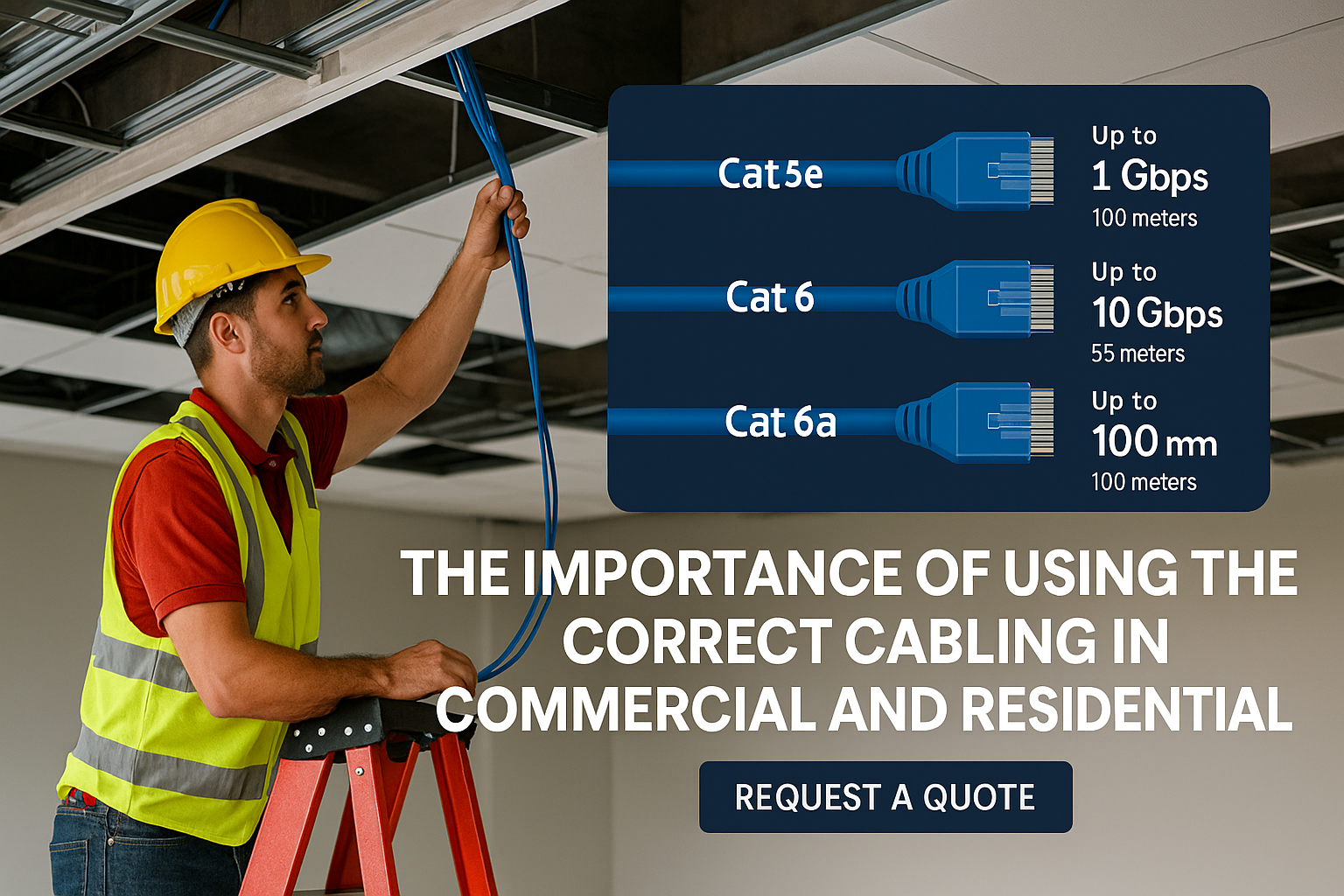
| Cable Category | Typical Max Speed | Typical Max Distance* | Notes |
| Cat5e | 1 Gbps (1000BASE‑T); 2.5/5 Gbps often supported with 802.3bz | 100 m (328 ft) for 1G/2.5G/5G | Budget‑friendly. Fine for PoE/PoE+. Good for most residential and light commercial. |
| Cat6 | 1 Gbps @ 100 m; 10 Gbps up to 55 m (conditions apply) | 100 m for 1G; up to 55 m for 10G | Better crosstalk control than 5e; common for new builds. |
| Cat6A | 10 Gbps | 100 m | Heavier jacket/sep; best all‑around for new commercial if 10G is on roadmap. |
| Cat7/7A (ISO Class F/FA) | 10 Gbps | 100 m | Shielded by design; less common in North America; non‑standard connectors. |
| Cat8 | 25/40 Gbps | up to 30 m | Data center/inter‑rack use; not typical for building horizontal runs. |
*Distance assumes standard “channel” length with patch cords and good installation practices.
Solid vs. Stranded
- Solid conductor (23–24 AWG): Lower resistance and better distance; use for in‑wall/long runs.
- Stranded: Flexible for patch cords; not for long in‑wall runs.
Shielding (U/UTP vs. F/UTP vs. S/FTP)
- Unshielded (UTP): Most common; easier to terminate; fine for typical office/home runs.
- Foil/Braid Shielded: Adds protection near high EMI (elevators, generators, large motors, fluorescent ballasts, radio rooms). Requires bonding/grounding and proper connectors.
Power over Ethernet (PoE)
- PoE Types: 802.3af (up to ~15.4 W), 802.3at PoE+ (up to ~30 W), 802.3bt Type 3/4 (up to 60–90 W).
- Cable Matters: Higher power means more heat and voltage drop. Prefer 23 AWG Cat6/6A for long/high‑power PoE (pan‑tilt‑zoom cameras, heaters, access points). Keep large bundles ventilated.
- Distance: Standard Ethernet (and PoE) runs top out at 100 m. For longer distances, use PoE extenders, midspans, or fiber + media converters.
Low‑Voltage Beyond Ethernet (Security & Life Safety)
- Cameras: New installs favor Cat6/6A + PoE. Legacy analog uses RG59 Siamese (video + 18/2 power); OK for short runs or when re‑using coax.
- Access Control: Mix of Ethernet to panels/controllers and 18/2 or 22/4 to readers, REX devices, and door hardware.
- Intrusion Sensors: Typically 22/2 or 22/4 stranded (supervised loops), home‑runs to a panel.
- Fire Alarm: Use FPL/FPLR/FPLP rated cable as required by code and AHJ. Do not substitute generic low‑voltage cable.
Code Ratings & Environment
- CMP (Plenum): For air‑handling spaces (return‑air ceilings). Low smoke, fire‑resistant. Use CMP where required.
- CMR (Riser): For vertical shafts/floor‑to‑floor. Use CMR in risers when plenum isn’t required.
- CM/CMG: General use in single floors where neither plenum nor riser is required.
- Outdoor/UV/Direct‑Burial: Use CMX/outdoor‑rated or gel‑filled/direct‑burial with proper conduit and drip loops.
Tip: When in doubt, plenum (CMP) is the safest all‑around rating for indoor spaces with return‑air.
Installation Best Practices
- Follow the 100‑m rule: 90 m permanent link + 10 m patch. Plan your closets to meet this.
- Respect bend radius & pull tension: Avoid kinks; don’t exceed 25–35 lbf pull depending on cable.
- Keep away from power: Maintain 12–18 inches from AC power; cross at 90° if necessary.
- Terminate correctly: Use the same standard end‑to‑end (T568B is common). Test with a certifier when possible.
- Label everything: Jack, patch panel, and device. Keep a map.
- Allow slack & service loops: Leave a manageable service loop in ceilings/racks.
- Plan for growth: Pull spares to high‑value locations (cameras, WAPs, access points, kiosks).
Choosing the Right Cable for Each Space
- Modern Residential: Cat6 to every TV, office, WAP, camera. If you want to future‑proof for 10G backbone or high‑density Wi‑Fi, go Cat6A to WAPs and key drops.
- Light Commercial/Retail: Cat6 for general drops; Cat6A to WAPs and camera‑dense areas. Use plenum in return‑air ceilings.
- Large Commercial/Education/Healthcare: Cat6A horizontal standard, fiber uplinks between closets, and PoE++ planning for cameras/APs.
Speed & Range Cheat Sheet (Copy/Paste Friendly)
- 1 Gbps: Cat5e/Cat6/Cat6A up to 100 m
- 2.5/5 Gbps (802.3bz): Often supported on Cat5e/Cat6 up to 100 m
- 10 Gbps: Cat6 up to ~55 m; Cat6A up to 100 m
- 25/40 Gbps: Cat8 up to ~30 m (short data‑center runs)
The Bottom Line
If you’re opening walls or pulling new cable, choose the standard that will meet needs 5–10 years out. For most projects, that means Cat6 at a minimum, with Cat6A in camera‑dense or Wi‑Fi‑heavy areas and anywhere you anticipate 10‑gig uplinks. Pair the right cable with PoE‑ready switches, and your cameras, access points, and controllers will have the performance and power they need.
Ready to plan a low‑voltage refresh? Custom Alarm Contractors can survey your site, spec the right cable types, and install to code—so your system is fast, clean, and future‑proof.